
The Access Control module is a security feature used to allow or block access from specific IP addresses or networks. It helps protect the IP-PBX system by controlling which devices, servers, or external systems are permitted to connect.
Administrators can create rules to whitelist trusted IP addresses or block unauthorized connections, improving system security and reducing the risk of unwanted or malicious access.
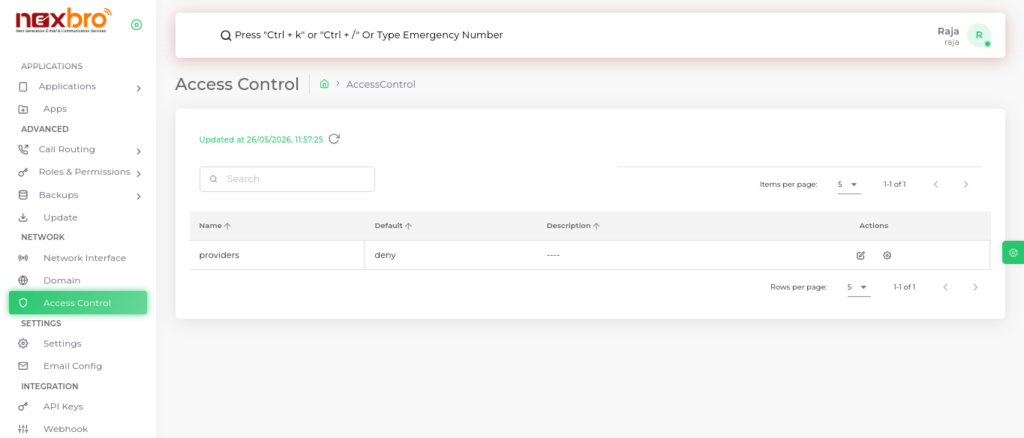
Access Control Nodes
This section allows the admin to define specific IP addresses or CIDR ranges and set their access permissions.
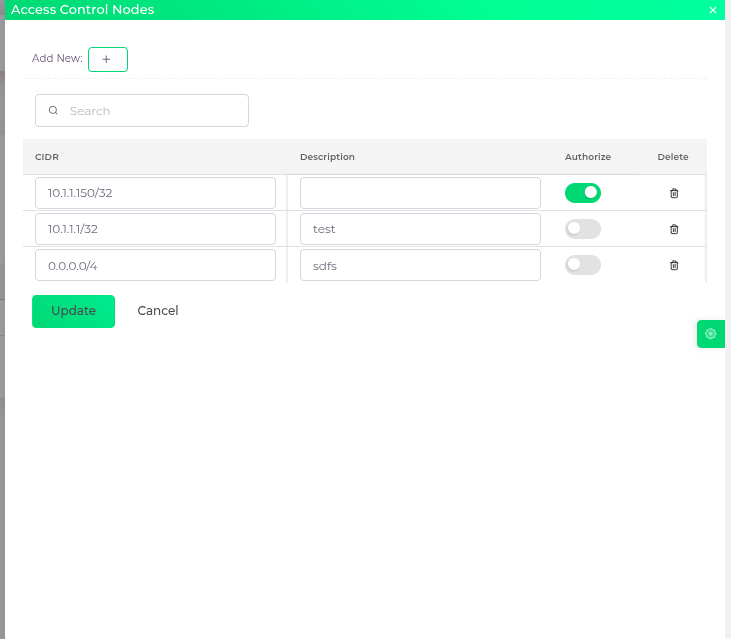
Here, the following details need to be configured:
- CIDR – IP address or range in CIDR format (e.g., 192.168.1.0/24).
- Description – A short note describing the purpose of the rule.
- Authorize – Toggle to allow or deny access for the defined IP/range.
- Delete – Option to remove the rule.
The admin can click on “Add New” to create a new access rule and then click “Update” to save changes.
All records can be updated or removed as per security requirements. Regular monitoring is recommended to maintain system security.
