
The Server Health module provides real-time monitoring of critical services and system resources within the IP-PBX server. It helps the admin monitor service availability, server performance, memory utilization, CPU load, and disk usage from a centralized dashboard.
This module assists in maintaining system stability and quickly identifying operational issues.
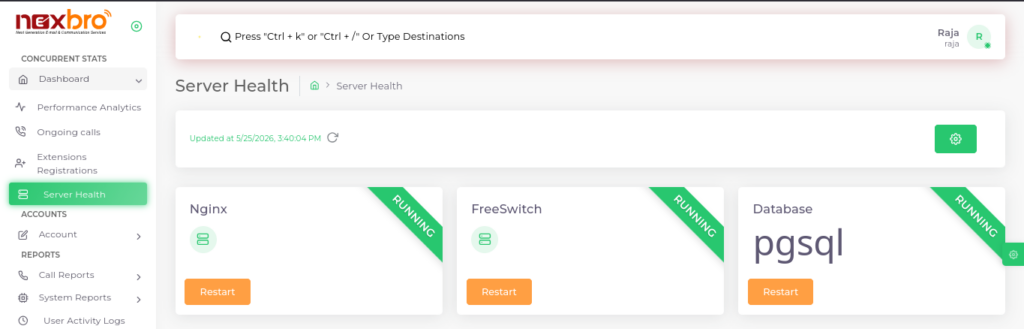
This screen displays the operational status of important server services.
The following services are monitored:
- Nginx – Web server service status
- FreeSwitch – Core telephony engine/service status
- Database – Database service status (PostgreSQL/pgsql)
Each service card displays:
- Current Status – Indicates whether the service is Running or not
- Restart Button – Allows the admin to restart the service if required
This section helps ensure all essential services are functioning properly.
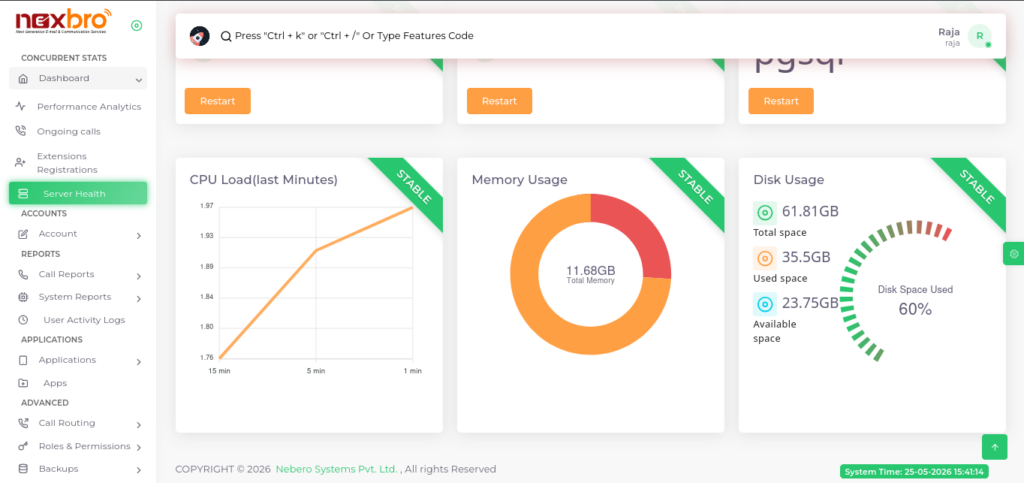
This screen displays server resource utilization and system performance metrics.
CPU Load (Last Minutes)
This section displays recent CPU load statistics in graphical format.
It helps the admin:
- Monitor server processing load
- Analyze CPU usage trends
- Detect abnormal CPU spikes or performance issues
The graph displays load values for recent time intervals.
Memory Usage
This section displays server memory utilization in chart format.
The following details are available:
- Total Memory – Total RAM available on the server
- Used Memory – Memory currently being utilized
- Available Memory – Remaining free memory
This helps monitor server memory consumption and system performance.
Disk Usage
This section displays storage utilization details and disk usage percentage.
The following details are available:
- Total Space – Total available disk storage
- Used Space – Currently utilized storage
- Available Space – Remaining free storage
- Disk Usage Percentage – Overall storage utilization percentage
This helps prevent storage-related issues and backup failures.
Key Uses of Server Health Module
The admin can use this module to:
- Monitor critical server services in real time
- Restart failed or unresponsive services
- Track CPU, memory, and disk utilization
- Analyze overall server performance
- Identify potential system resource issues early