The Profile module allows users to manage their account information, active login sessions, and account password. This section helps maintain account security and personalize user settings within the IP-PBX system.
Users can update profile details, monitor active devices, and change passwords securely from a centralized interface.
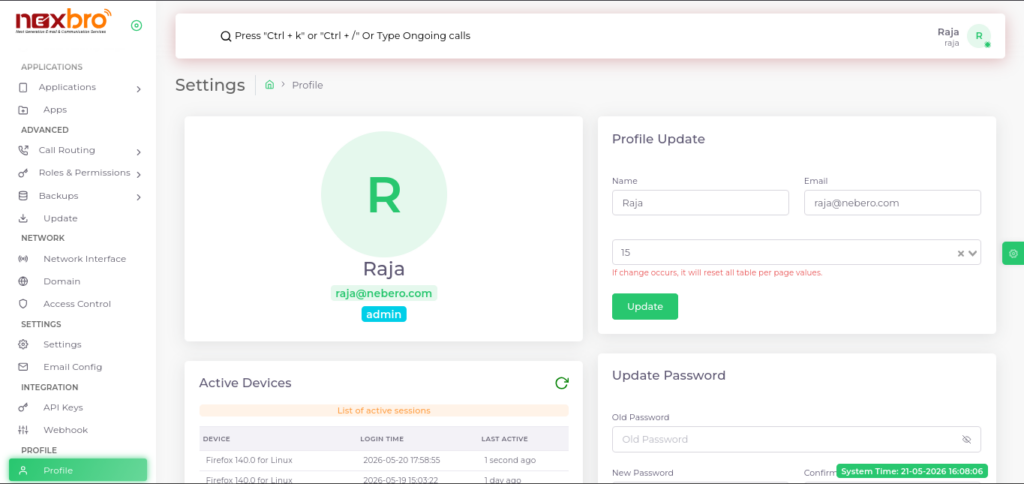
This screen displays the user profile overview along with profile management options.
Profile Information
This section displays basic account information such as:
- User Name – Name of the logged-in user
- Email Address – Registered email ID
- Role – Assigned user role (e.g., Admin)
Profile Update
The user can update profile-related information using this section.
The following details can be modified:
- Name – Update display name
- Email – Update registered email address
- Table/Page Preference – Configure default table pagination value
Click the “Update” button to save profile changes.
Note: Changing table/page preference may reset existing table display settings.
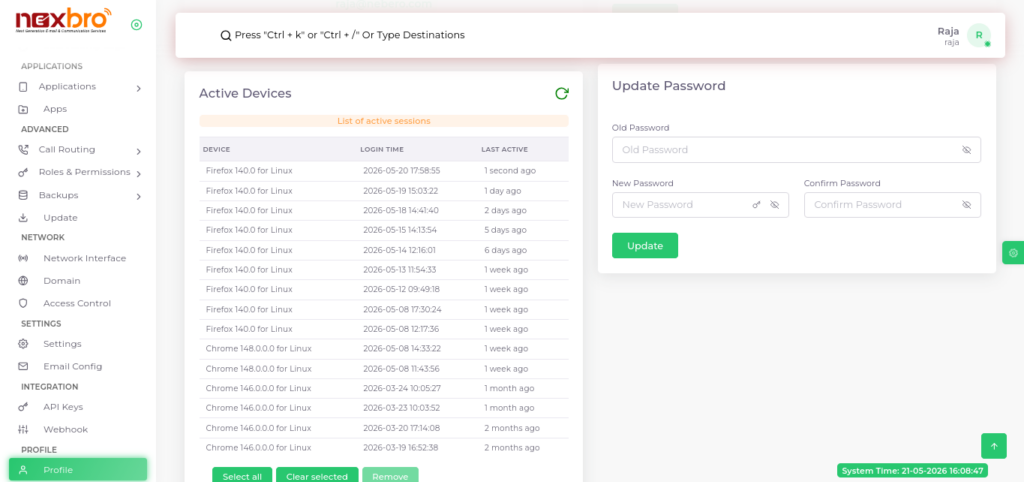
This screen displays active login sessions and password management options.
Active Devices
This section displays all active or recently used login sessions.
Here, the following details are available:
- Device – Browser/device information used for login
- Login Time – Date and time of login
- Last Active – Last activity timestamp for the session
The following actions are available:
- Select All – Select all sessions
- Clear Selected – Deselect sessions
- Remove – Remove selected active sessions/devices
This helps improve account security by managing active logins.
Update Password
This section allows users to securely change their account password.
The following details need to be entered:
- Old Password – Current account password
- New Password – New password to be set
- Confirm Password – Re-enter new password for confirmation
Click the “Update” button to save the new password.