
Skip to content
Apps - Nexbro
Back
  • Home
  • Products
    • IPPBX
    • Email
  • Case Studies
  • FAQs
  • Docs
  • Contact Us

Get in Touch

    Edit Template
    Back
    • Home
    • Products
      • IPPBX
      • Email
    • Case Studies
    • FAQs
    • Docs
    • Contact Us

    Get in Touch

      Edit Template
      betterdocs-category-icon

      Nexbro Admin Panel

      42
      • Dashboard
        • Performance Analytics
        • Ongoing Calls
        • Extensions Registrations
        • Server Health
      • Accounts
        • Users
        • Extensions
        • Devices
        • Gateways
        • SIP Profiles
      • Reports
        • Server Health Report
        • User Activity Logs
        • Call Reports
          • Call Detail Records
          • Conference CDR
          • Blocked Calls
      • Applications
        • Features Code
        • Recordings
        • Conferences Center
        • IVR
        • Ring Group
        • Caller Id Numbers
        • Emergency Number
        • Speed Dialer
        • Apps
      • Advanced
        • Update
        • Call Routing
          • Inbound Routes
          • Outbound Routes
          • Time Condition
          • Call Block
        • Roles And Permissions
          • Roles
          • Permissions
        • Backup & Restore
          • Destinations
          • Jobs
          • Restore
          • Update
      • Network
        • Network Interface
        • Domain
        • Access Control
      • Settings
        • Settings
        • Email Config
      • Integrations
        • API Keys
        • Webhook
      • Profile
        • Profile
      betterdocs-category-icon

      Nexbro Rest Api's

      19
      • Release Notes​
      • Getting Started
        • Overview
        • Steps for create API KEY
      • Webhook Events
        • Overview
        • Call Events
        • Extension Events
      • Rest APIs
        • Call Recording
        • Ongoing Calls
        • Call Detail Records
        • Call Detail Record
        • Extensions
        • Gateways
        • Call Transfer
        • Call Unhold
        • Call Hangup
        • Call Hold
        • Call Unmute
        • Call Mute
        • Call Originate
      View Categories

      Apps

      This screen shows the applications available for integration with the system to add extra features and functionality. Each application provides specific services such as call handling, announcements, or conferencing. Users can view application details and install the required apps based on their needs.
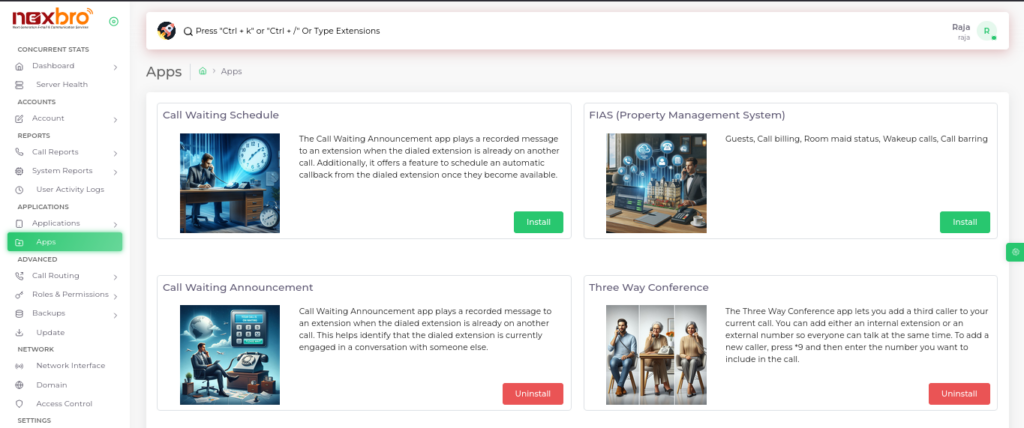
      The “Install” button allows quick activation of any selected application.

      What are your Feelings
      Facebook Twitter Linkedin

      Other Pages

      Home

      About Us

      IPPBX

      Mail Services

      Quick Links

      Privacy Policy

      Terms of Services

      FAQs

      © 2025 Nebero. All Rights Reserved.

      WhatsApp us