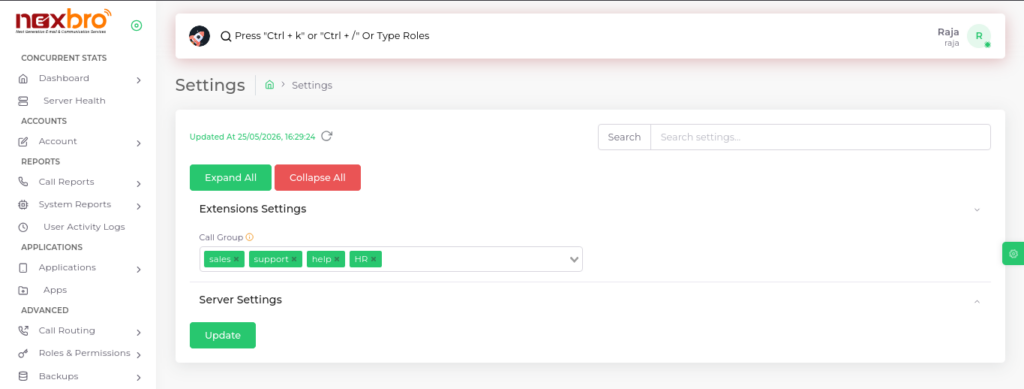
A list of all settings is displayed here, which can be edited and updated as per the
admin’s choice. The list includes:
Agent Session Settings

| Fields Name | Description | Example |
| Mute Button | Visibility of mute button in session. If you disable the mute button, the agent will not be able to mute the call. | |
| Hold Button | Visibility of hold button in session. If you disable the hold button, the agent will not be able to hold the call. | |
| Hangup Button | Visibility of hangup button in session. If you disable the hangup button, the agent will not be able to hang up the call. | |
| Transfer Button | Visibility of transfer button in session. If you disable the transfer button, the agent will not be able to transfer the call. | |
| Schedule Button | Visibility of schedule button in session. If you disable the schedule button, the agent will not be able to schedule the call. | |
| Conference Button | Visibility of conference button in session. If you disable the conference button, the agent will not be able to start a conference call. | |
| Reconnect Duration | Determines the amount of time (in seconds) the system will allow the agent to reconnect a dropped or lost session. | |
| Temp Break Duration | Determines the duration (in seconds) of a temporary break where the agent can choose to take a break. | |
| Mute Duration | Determines the maximum duration (in seconds) the agent can mute the call. | |
| Hold Duration | Determines the maximum duration (in seconds) the agent can hold the call. | |
| Short Breaks Allowed | Determines how many short breaks are allowed in the past 12 hours. | |
| Long Break Allowed | Determines how many long breaks are allowed in the past 12 hours. | |
| Temp Breaks Allowed | Determines how many temporary breaks are allowed during the session. | |
| Whatsapp Instant Message Button | Visibility of WhatsApp Instant Message button in session. If disabled, the agent will not be able to send predefined WhatsApp messages to the caller. | |
| Whatsapp Chat | Visibility of WhatsApp Instant Message button in session. If disabled, the agent will not be able to send predefined WhatsApp messages to the caller. |
Extension Settings
Extensions Settings allows you to assign
call groups (like HR, Sales, etc.) to manage how calls are routed and handled within different teams.

Call Group
Users within the same call group can answer or “pick up” incoming calls for other members in the group. This helps teams manage calls efficiently when someone is unavailable. You can specify call group in settings
Server Settings
Server Settings is used to configure system-level options like NTP servers, which ensure accurate time synchronization across the system. These settings help in organizing communication flow and maintaining proper system timing for smooth operations.
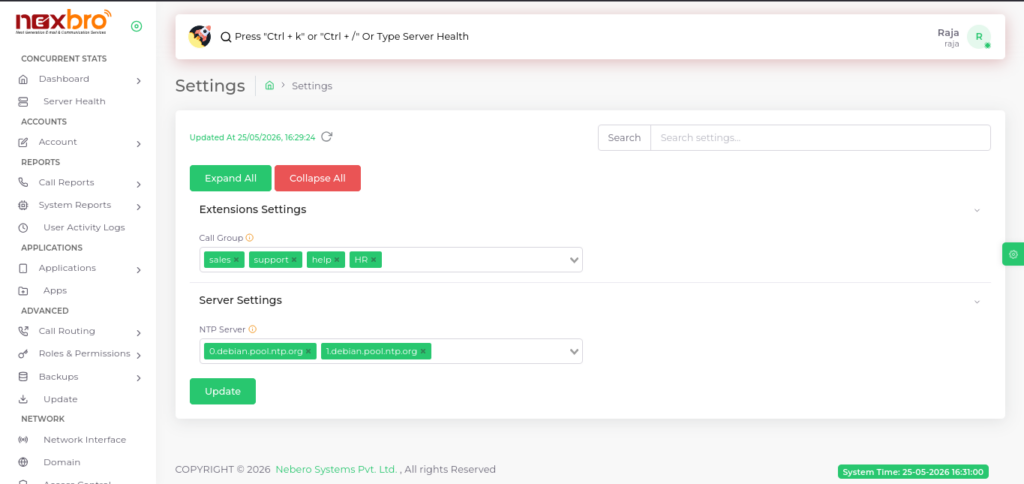
- NTP server used to keep system time synced and accurate.
- Update Configures call groups for routing and NTP server settings to ensure proper communication flow and accurate system time synchronization.