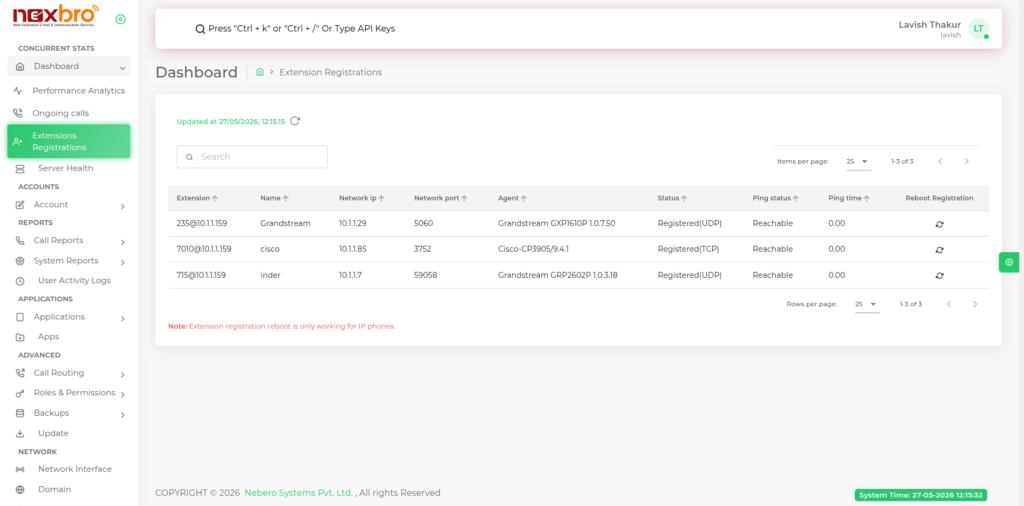
The list of all registered extensions is displayed here, along with their respective details. Extensions represent endpoints such as IP phones, softphones, or devices that are connected to the IP-PBX system for handling calls.
This section allows the admin to monitor the real-time registration status and connectivity of all extensions in the system.
Here, the following details are available:
- Extension – Unique identifier assigned to each user/device.
- Name – Name of the user or device associated with the extension.
- Network IP – IP address from which the device is registered.
- Network Port – Port number used by the device for communication.
- Agent – Type of client/device (e.g., SIP client, softphone, IP phone).
- Status – Shows whether the extension is registered (TCP/UDP).
- Ping Status – Indicates whether the device is reachable over the network.
- Ping Time – Displays the response time between server and device.
- Reboot Registration – Option to remotely reboot/re-register the device (applicable for IP phones).
The admin can use this module to:
- Verify whether extensions are properly registered
- Troubleshoot connectivity issues
- Monitor device availability in real-time
- Reboot IP phones remotely when required
The records can be refreshed periodically to ensure the latest status is displayed.
Note: Extension reboot functionality is supported only for IP phones.