
The Network Interface module allows the admin to manage and configure network interfaces used by the IP-PBX server. It provides interface-level configuration for IP addressing, gateways, and routing information required for proper network communication.
This module helps ensure stable connectivity between the server, gateways, SIP devices, and external networks.
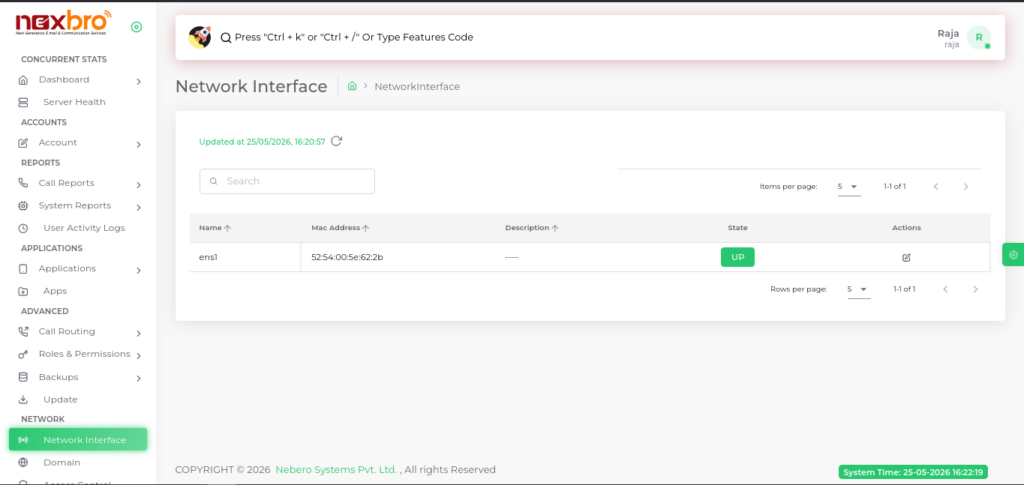
This screen displays all available network interfaces configured on the server.
Here, the following details are available:
- Name – Name of the network interface
- Mac Address – Hardware MAC address of the interface
- Description – Additional information about the interface
- State – Shows whether the interface is active (UP) or inactive
- Actions – Option to edit the network interface configuration
This section helps the admin monitor interface availability and manage network settings.
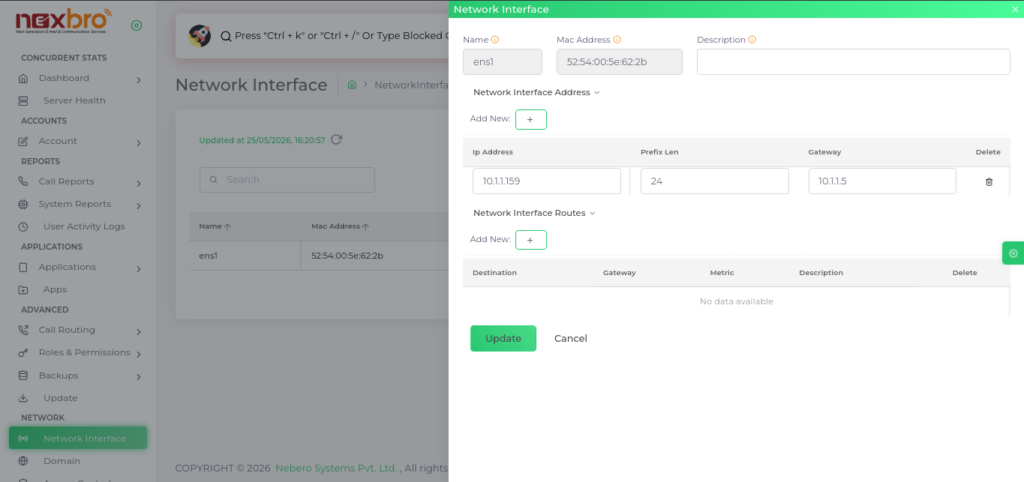
This screen allows the admin to configure and update network interface settings.
The following details are available:
Basic Interface Details
- Name – Interface name
- Mac Address – MAC address assigned to the interface
- Description – Optional description for identification
Network Interface Address
This section is used to configure IP address settings.
The admin can add multiple address entries using the “+” button.
The following details need to be configured:
- IP Address – IP assigned to the interface
- Prefix Len – Network prefix/subnet length
- Gateway – Default gateway address
Network Interface Routes
This section allows the admin to configure static routing information.
The admin can add route entries using the “+” button.
The following details are available:
- Destination – Destination network address
- Gateway – Gateway used for routing
- Metric – Route priority value
- Description – Additional route informatio
After making the required changes, click the “Update” button to save the configuration.