
The Caller ID Numbers module allows administrators to manage and configure the caller ID numbers used for inbound/outbound calls in the system. These numbers are displayed to recipients when users make outgoing calls.
Administrators can assign caller ID numbers to specific extensions based on business requirements. This module helps maintain proper caller identification, improve call recognition, and manage inbound/outbound calling more effectively.
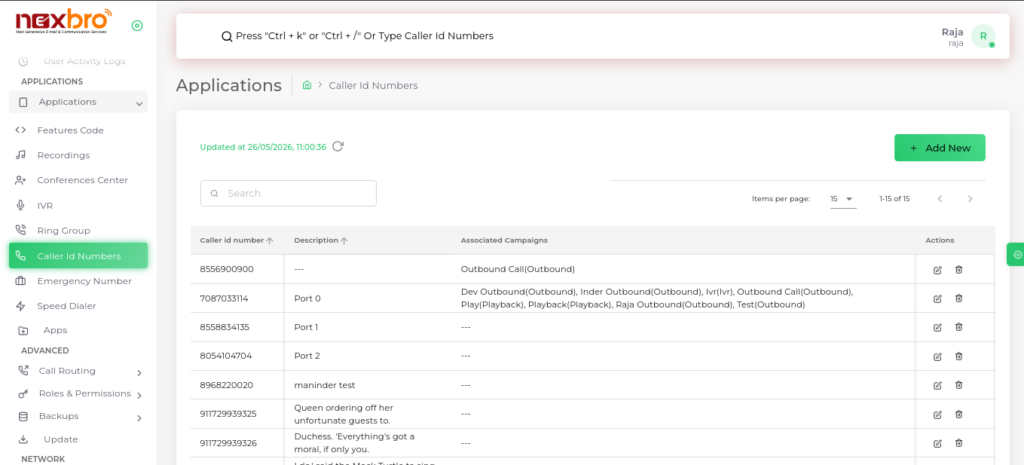
This screen displays the list of all configured caller ID numbers in the system.
Add Caller ID Number
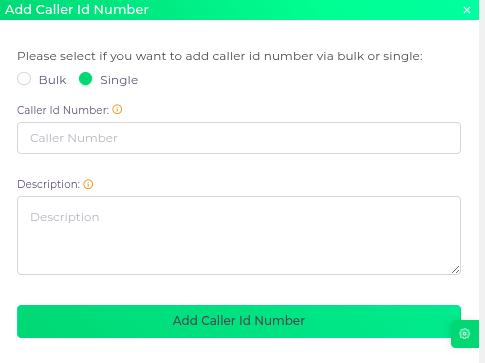
This screen allows the admin to add a new caller ID number.
Click the “Add Caller Id Number” button to save the entry.
The following details need to be configured:
| Fields Name | Description |
| Caller Id Number | The number that will appear on the recipient’s phone when an outbound call are made |
| Description | A description for the Caller ID number |
