
The Email Configuration module allows administrators to configure and manage the email settings used by the IP-PBX system. These settings are required for sending system-generated emails such as notifications, alerts, reports, voicemails, password resets, and other important communications.
Administrators can configure SMTP server details, authentication settings, sender information, and other email parameters to ensure reliable and secure email delivery from the platform.
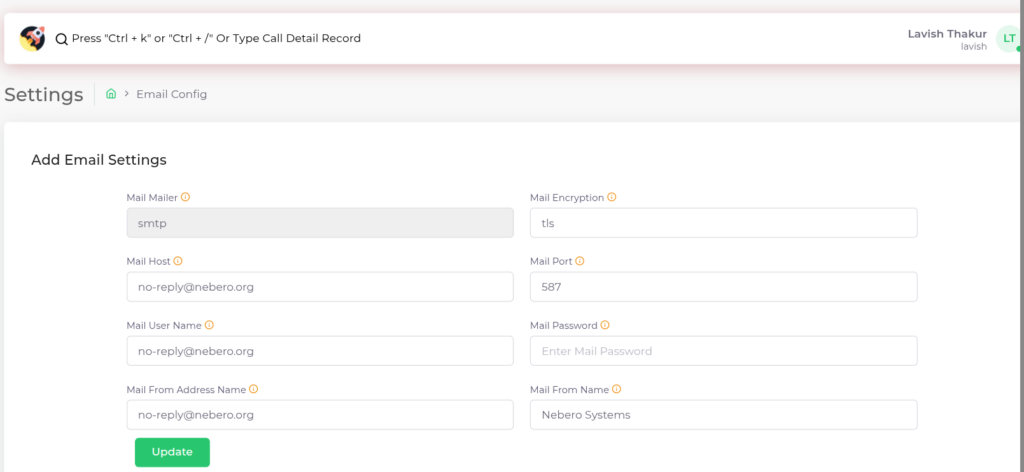
Click the “Update” button to save the email configuration.
| Fields Name | Description |
| Mail Mailer | The mailer used to send emails. |
| Mail Encryption | The encryption used for authentication with the mail server. |
| Mail Host | The host address of the mail server. |
| Mail Port | The port number of the mail server. |
| Mail User Name | The username used for authentication with the mail server. |
| Mail Password | The password used for authentication with the mail server. |
| Mail From Address Name | The email address used as the sender’s address. |
| Mail From Name | The name associated with the sender’s email address |
Send Test Mail – Overview
This section allows you to send a test email to verify that the email configuration is working correctly. You need to enter the receiver email, subject, and message, then click Send Test Mail. It helps ensure that emails are being delivered properly after setup. The Cancel option clears the input or stops the action.
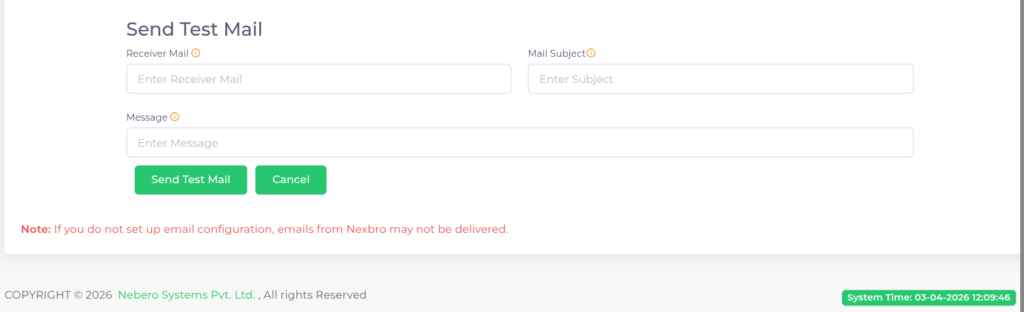
| Fields Name | Description |
| Receiver Mail | The receiver email |
| Mail Subject | The mail subject |
| Message | The mail message |
- Send Test Mail sends a test email to verify configuration.
- Cancel clears the form or aborts the action.
Note: If email configuration is not properly set, system emails may not be delivered.
