
The API Keys module allows the admin to create and manage API keys for secure integration with external systems or applications. These keys are used to authenticate and control access to the IP-PBX APIs.
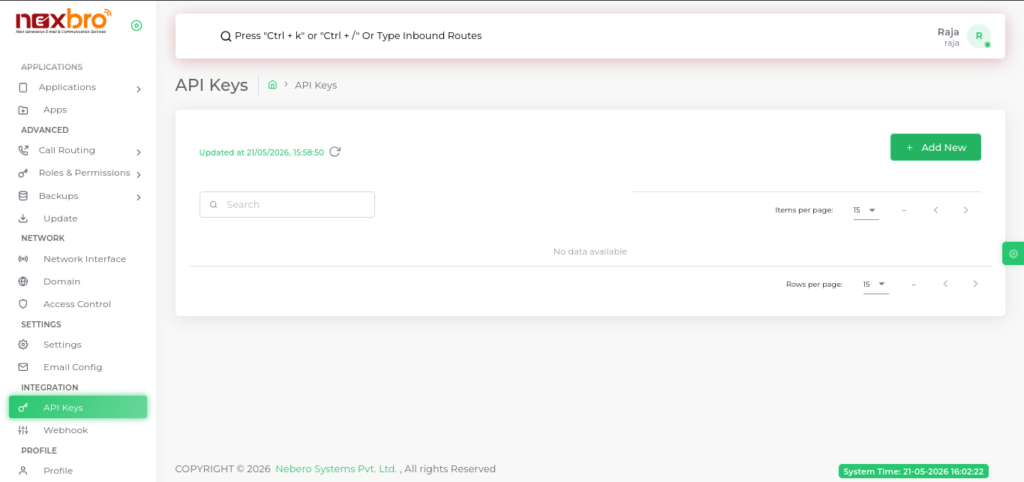
This section helps ensure that only authorized systems can interact with the platform.
Here, the following details are available:
- Name – A unique name assigned to the API key for identification.
- Active – Indicates whether the API key is enabled or disabled.
- Allowed IPs – Specifies the IP addresses from which API access is permitted.
- Rate Limit – Defines the maximum number of API requests allowed within a specific time period.
- Description – A brief note describing the purpose of the API key.
- Actions – Options to edit or delete the API key.
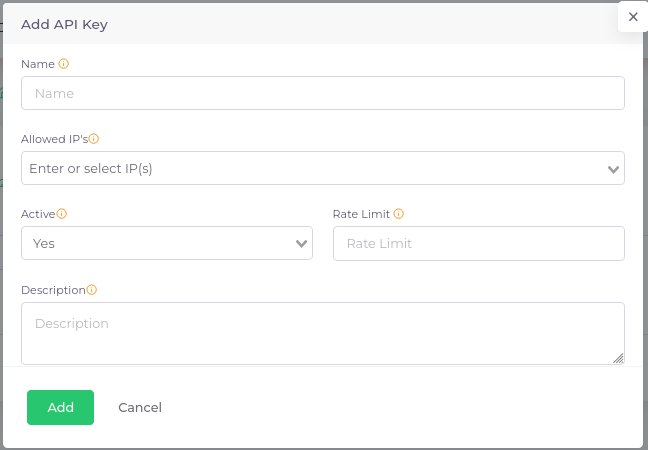
The admin can click on “Add New” to create a new API key.
These records can be edited or deleted as per requirement. Regular monitoring is recommended to maintain security.
| Field Name | Description |
| Name | A name to help you identify this API key (e.g., ‘Sales CRM Key’ or ‘Internal Automation’). |
| Allowed IP’s | A list of IP addresses from which this API key can be used. Leave blank to allow requests from any IP, or specify as needed for enhanced security. |
| Active | If enabled, this API key can be used to access Nexbro API’s. Disabling it will block any requests using this key, without deleting the record. |
| Rate Limit | Maximum number of allowed requests per day for this API key. Setting this value helps protect Nexbro API’s from overuse or abuse. |
| Description | Add details or notes describing the intended use or scope of this API key (e.g., ‘Used by sales CRM’). |
