
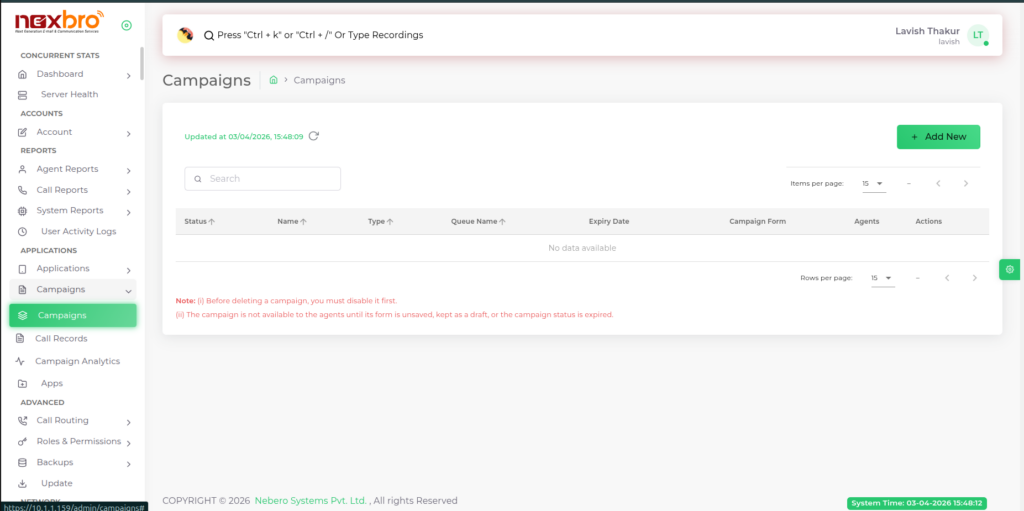
This screen displays the Campaigns management page, where all created campaigns are listed and monitored. It shows key details such as campaign status, name, type, assigned queue, expiry date, associated form, agents, and available actions. You can use the search bar to quickly find campaigns and the “+ Add New” button to create a new campaign. The table supports pagination and sorting, while notes at the bottom highlight important rules like disabling a campaign before deletion and availability conditions for agents.
Add New Campaign
This screen shows the Campaigns module where you can create and manage outbound/inbound campaigns. The right-side panel (“Add New Campaign”) allows you to configure a new campaign b y entering details like campaign name, type, gateway, and queue.
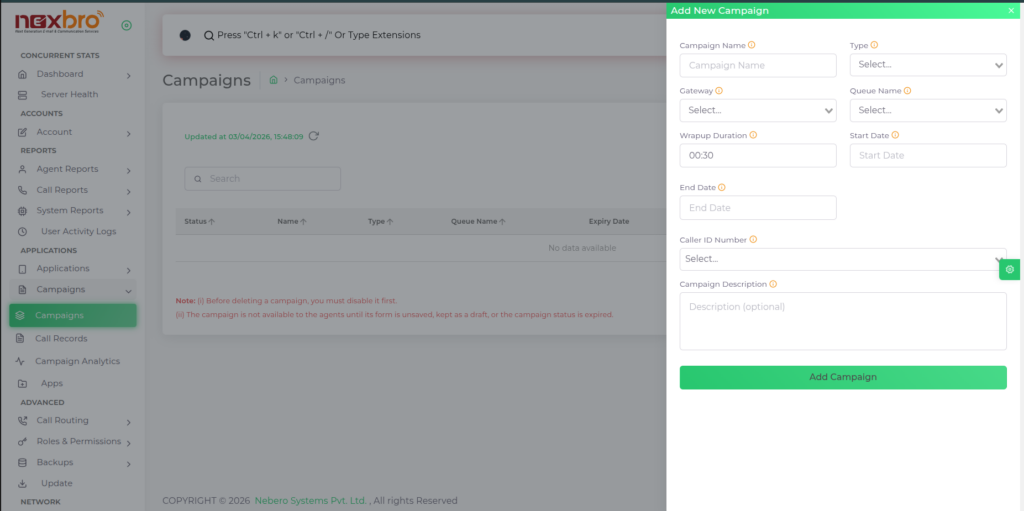
You can also set wrap-up time, start/end dates, and caller ID, along with an optional description. Once all required fields are filled, clicking “Add Campaign” will create the campaign and make it available for agents based on its status.
| Fields Name | Description | Example |
| Campaign Name | The name of the campaign, which will be visible to agents | |
| Type | The type of the campaign, whether it is Inbound, Outbound, Playback, or IVR. Here is a brief explanation of each: Inbound: Routing incoming calls to specific agents associated with a specific campaign. Outbound: Originating outbound calls and redirecting the caller to a specified queue. Playback: Used for broadcasting purposes. A campaign with the type ‘Playback’ will play a specified recording to the specified contacts. IVR: Originating outbound calls and redirecting the caller to a specified IVR menu. | |
| Gateway | The gateway used to originate calls | |
| Queue Name | The queue for which you want to create the campaign | |
| Wrapup Duration | The time set for wrap-up and form filling for agents | |
| Start Date | The date when the campaign will start | |
| End Date | The date when the campaign will end | |
| Caller ID Number | The number used to appear as the Caller ID number on outgoing calls | |
| Campaign Description | A description for the campaign |
